Antispamwatch.com, ezantispy.com, pcprotectiontools.com and some other websites listed below are clearly affiliated with the rogue anti-virus program called Antivirus IS. In total we've found eleven websites related to this rogue security product but there are probably even more. The bad guys use four different web templates, green, blue, yellow and grey (see images below). The main purpose of these misleading websites is to trick people into thinking that Antivirus IS is a legitimate anti-virus program. All these websites provide false information and after all may give a false sense of security for a user that may not realize that Antivirus IS is a scam. You may find information about Antivirus IS Basic, Antivirus IS Pro and Antivirus IS Ultimate on these websites as well and even purchase any of them. However, you shouldn't purchase it. Instead, please follow instructions on how to remove Antivirus IS from your computer for free using legitimate anti-malware programs. If you have any questions or additional information about any of these malicious websites or the rogue program please leave a comment. Good luck and be safe online:
Misleading websites affiliated with Antivirus IS malware:
Another day, another threat lurking on the Internet. This time we've found several malicious software installers. The malware masquerades as an installer for a program, i.e. Avast! Antivirus, NOD32 Antivirus, Emule, DivX7, Windows Media Player 11, Limware, Format factory and some other well known software.
The rogue installer prompts user to to send SMS messages to a premium number and obtain a code to complete the program installation. It's not as aggressive as ransomware, but it's still a threat. Besides, the fake installer drops malicious files upon execution:
These fake installers were made for users residing in western and central European countries, mainly Spain, France, Germany, Switzerland, The Netherlands and Belgium. Secretly installed files are Trojans that may download additional malware onto your computer. Here's a list of malicious websites that distribute these fake installers:
antivirus-avast2009.com
antivirus-nod32-gratuit.com
div-x-gratis.com
divx-9-gratuit.com
emule09-download.com
limewire-gratuit.com
lw-download.com
media-player12.com
ut-download.com
utorrent-gratuit.com
If you suspect that your computer is infected please download free anti-malware software from the list below and run a full system scan.
NOTE: before saving the selected program onto your computer, please rename the installer to iexplore.exe orwinlogon.exe. With all of these tools, if running Windows 7 or Vista they MUST be run as administrator. Launch the program and follow the prompts. Don't forget to update the installed program before scanning. Fake installers display the following messages:
Antivirus IS is a rogue anti-virus program that attempts to convince you that your computer is infected with spyware, adware, Trojans, worms and other viruses. It masquerades as legitimate AV software and pretends to scan your computer for malware. Then it claims to find numerous infected files on your computer and forces to register the program in order to remove supposedly infected files. Basically, it reports false system security threats. Of course, you shouldn't purchase Antivirus IS. First of all, you probably didn't ask for this program and secondly, it won't remove any infections from your computer. It's a scam. You should definitely remove Antivirus IS from your computer. Please follow the removal instructions below.
(Thanks to rogueamp)
Antivirus IS scareware is from the same family as Security Suite. It comes from fake online anti-malware scanners and other infected websites. Most of the time, it masquerades as a free malware removal tool or a flash player. It has to be manually installed, thought, in some cases it may come bundled with other malware or downloaded onto your computer by Trojans without your permission and knowledge. Once installed, Antivirus IS will report false system security threats, display fake security warnings and notifications. It will claim that your computer is unprotected and has some serious security problems. As usual, such rogue programs ask to pay for a full version of the program to remove infected files and to ensure full system protection against new viruses.
While running, Antivirus IS will hijack Internet Explorer and set up a local proxy server to reroute traffic to misleading websites. It will redirect you to various unrelated websites full of Ads and other malicious content. It may display adult websites too. The main home page of this rogue program is ezantispy.com. It's like a purchase page of this rogue program.
A screen shot of ezantispy.com:
What is more, Antivirus IS will block nearly all programs on your computer and then display the following error message:
Security warning Application cannot be executed. The file [file_name].exe is infected. Do you want to activate your antivirus software now?
Antivirus software alert INFILTRATION ALERT Your computer is being attacked by an internet virus. It could be a password-stealing attack, trojan - dropper or similar. Threat: Win32/Nuqel.E
It will disable task manager and registry editor. In some cases it disables system restore as well. Antivirus IS can come bundled with TDSS rootkit. You should scan your computer with TDSSKiller utility after you remove the rogue program. For more information please read TDSS, Alureon, Tidserv, TDL3 removal instructions using TDSSKiller utility.
Thankfully, we've got the removal instructions to help you to remove Antivirus IS from your computer for free. You should get rid of this virus and any related malware as soon as possible and it may download additional malware onto your computer. Also note, if you have already purchased this bogus program then please contact your credit card company as soon as possible and dispute the charges. Last, but not least, if you have any questions about Antivirus IS infection, please leave a comment. Good luck and be safe online!
Antivirus IS removal instructions (in Safe Mode with Networking):
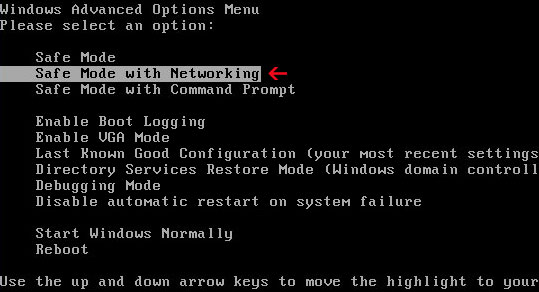
1. Reboot your computer is "Safe Mode with Networking". As the computer is booting tap the "F8 key" continuously which should bring up the "Windows Advanced Options Menu" as shown below. Use your arrow keys to move to "Safe Mode with Networking" and press Enter key. Read more detailed instructions here: http://www.computerhope.com/issues/chsafe.htm
NOTE:Login as the same user you were previously logged in with in the normal Windows mode.
2. Launch Internet Explorer. In Internet Explorer go to: Tools->Internet Options->Connections tab. Click Lan Settings button and uncheck the checkbox labeled Use a proxy server for your LAN. Click OK.
3. Download free anti-malware software from the list below and run a full system scan.
NOTE: in some cases the rogue program may block anti-malware software. Before saving the selected program onto your computer, you may have to rename the installer to iexplore.exe orwinlogon.exe With all of these tools, if running Windows 7 or Vista they MUST be run as administrator. Launch the program and follow the prompts. Don't forget to update the installed program before scanning.
4. New threats appear every day. In order to protect your PC from such (new) infections we strongly recommend you to use ESET Smart Security.
Antivirus IS removal instructions using HijackThis (in Normal mode):
1. Download iexplore.exe (NOTE: iexplore.exe file is renamed HijackThis tool from TrendMicro). Launch the iexplore.exe and click "Do a system scan only" button. If you can't open iexplore.exe file then download explorer.scr and run it.
2. Search for such entry in the scan results: O4 - HKCU\..\Run: [mzkhgqspw] %Temp%\wkdjslrst\qghdrpcylanw.exe
The process name will be different in your case [SET OF RANDOM CHARACTERS]lanw.exe, located in: C:\Documents and Settings\[User Name]\Local Settings\Temp\ for Windows XP C:\Users\[User Name]\AppData\Local\Temp\ for Windows Vista & 7 Select all similar entries and click once on the "Fix checked" button. Close HijackThis tool.
OR you may download Process Explorer and end Antivirus IS process:
[SET OF RANDOM CHARACTERS]lanw.exe
3. Download free anti-malware software from the list below and run a full system scan.
NOTE: in some cases the rogue program may block anti-malware software. Before saving the selected program onto your computer, you may have to rename the installer to iexplore.exe orwinlogon.exe With all of these tools, if running Windows 7 or Vista they MUST be run as administrator. Launch the program and follow the prompts. Don't forget to update the installed program before scanning.
4. New threats appear every day. In order to protect your PC from such (new) infections we strongly recommend you to use ESET Smart Security.
Antivirus IS associated files and registry values:
Files:
For Windows XP users:
C:\Documents and Settings\[User Name]\Local Settings\Temp\[SET OF RANDOM CHARACTERS]
C:\Documents and Settings\[User Name]\Local Settings\Temp\[SET OF RANDOM CHARACTERS]\[SET OF RANDOM CHARACTERS]lanw.exe
For Windows Vista & 7 users:
C:\Users\[User Name]\AppData\Local\Temp\[SET OF RANDOM CHARACTERS]
C:\Users\[User Name]\AppData\Local\Temp\[SET OF RANDOM CHARACTERS]\[SET OF RANDOM CHARACTERS]lanw.exe
AndroidOS.FakePlayer is a Trojan Horse that masquerades as a movie player and attempts to send premium-rate SMS messages to specific numbers without the user's consent. It has to be manually installed. AndroidOS.FakePlayer does not replicate and affects only mobile devices (i.e. smartphones).
1. Go to the Settings icon and select Applications. 3. Next, click Manage. 4. Select the application (i.e. org.me.androidapplication1) and click the Uninstall button. 5. Install security software on your device to prevent such infections in the future. You may also choose mobile security software form the list below.
NOTE: Your phone manufacturer or service provider may have provided security software on your phone. Contact them to find out if they have any security solutions available.
Microsoft Security Antivirus ransomware is a piece of malware that locks Windows and forces victims to send an sms or call premium telephone numbers in order to get the activation code which unlocks the system. This trojan is promoted through the use of fake adult websites. Once you enter such a website you will be prompted to update you flash player in order to view adult online videos. Such rip-off scheme is very popular in Russian-speaking countries. But, of course, in theory any Internet user can end up with Microsoft Security Antivirus ransomware on his computer. A lot of people watch adult content every day and we can't changes that, but our advice would be to choose a well known adult website rather that searching for new ones using Google and you won't end up with infected websites. If your computer is infected with Microsoft Security Antivirus ransomware, please use the following codes to unlock your computer: 720194320Q or 77294738T. Then please scan your computer with legitimate anti-malware software listed below to remove the virus. If you have any questions, please leave a comment. Good luck and be safe online!
NOTE: before saving the selected program onto your computer, please rename the installer to iexplore.exe or winlogon.exe. With all of these tools, if running Windows 7 or Vista they MUST be run as administrator. Launch the program and follow the prompts. Don't forget to update the installed program before scanning.
A screen shot of Microsoft Security Antivirus ransomware: