Antivirmars.com is a rogue website which may compromise your computer security. It doesn't host malware, but it provides false information about program called Security Suite. Antivirmars.com has some false testimonials and states that SecuritySuite is a legitimate anti-virus program. In reality, though, Security Suite is a rogue security product that displays fake security warnings and deliberately reports system security threats. There's also a purchase page where you can buy Security Suite and you may even choose from three different versions: basic, pro and platinum. I really doubt that you could knowingly end up with Antivirmars.com. Usually, Security Suite malware or Trojans redirect users to Antivirmars.com and blocks other websites. If you are reading this post then your computer is probably infected too. Please follow Security Suite removal instructions to remove the rogue program and any additional malware from your computer for free with legitimate and reputable anti-malware programs. If you have any questions feel free to ask. Comments are more than welcome. Good luck and be safe online!
AWM Antivirus is a rogue anti-virus product that pretends to scan your computer for malware and then claims to find infected files. Then it forces users to pay registration fees to remove those supposedly infected files. Of course, you shouldn't buy it. AWM Antivirus reports false system security threats and displays fake security warnings about non-existent malware on your computer. It tries to deceive users into paying for a full version of the fake program. It goes without saying that you should remove AWM Antivirus from your computer as soon as you can. Unfortunately, it's not a legitimate program and it doesn't have uninstall options, so you won't be able to remove it by using the "Add or Remove Programs" feature. Thankfully we've got the instructions to help you get rid of this rogue program. Please follow our removal instructions below.
(Thanks to rogueamp)
AWM Antivirus is a clone of A-fast Antivirus. It displays fake security warnings and pop-ups with false information. Once installed, it displays a fake pop-up claiming that your computer is infected with spyware. The text of this fake pop-up is:
Your computer is infected! Windows detected spyware infection! It is recommended to use special antispyware tools to prevent dataloss. Windows will now download and install the most up-to-date antispyware for you.
Other fake messages look something likes this:
System warning! Continue working in unprotected mode is very dangerous. Viruses can damage your confidential data and work on your computer. Click here to protect your computer.
System warning! Intercepting programs that may compromise your privacy and harm your system have been detected on your PC. It's highly recommended you scan your PC right now.
AWM Antivirus may block legitimate programs and redirect users to various misleading websites full of Ads. The home page of this bogus security software is awm-antivirus.com. Please don't visit that page.
Screen shot of awm-antivirus.com (payment page):
As you can see AWMAntivirus forces victims to register the program for a fee to remove found malicious software from your computer. Do not fall victim to this attack and remove AWM Antivirus from the system upon detection. The removal guide below will show you to do this. Last, but not least, if you find difficult to remove this virus from your computer, you can activate it and make the removal procedure easier. But please note that still need to scan your computer with anti-malware software to remove the rogue program. Simply activating the program won't solve the problem. In order to activate AWMAntivirus please use one of the following codes:
B0B302F772
C197C46C46
B20C1467B7
041E4B235A
25CCCC7329
9926220EED
A58EC19D33
C15F2FF276
F61E370D62
DDAD6A7A2C
9F8122FE00
3754DD9DA6
3DC52EA100
EE73BBFFA6
7E61C9C7DF
EE34D2E8A7
AA61971AA1
9D2510E3E8
Click on "Active" button and enter the code. Now you should have the activated version of this scareware on your computer. By the way, if you have purchased it then please call your credit card company and dispute the charges. Also, if you have any questions or additional information about this virus, please don't hesitate and leave a comment. Good luck and be safe online!
AWM Antivirus removal instructions (in Safe Mode with Networking):
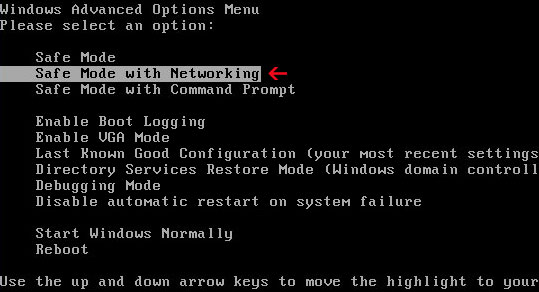
1. Reboot your computer is "Safe Mode with Networking". As the computer is booting tap the "F8 key" continuously which should bring up the "Windows Advanced Options Menu" as shown below. Use your arrow keys to move to "Safe Mode with Networking" and press Enter key. Read more detailed instructions here: http://www.computerhope.com/issues/chsafe.htm
NOTE:Login as the same user you were previously logged in with in the normal Windows mode.
2. Download at least one anti-malware program from the list below and run a full system scan.
NOTE: before saving the selected program onto your computer, please rename the installer to iexplore.exe orwinlogon.exe. With all of these tools, if running Windows 7 or Vista they MUST be run as administrator. Launch the program and follow the prompts. Don't forget to update the installed program before scanning.
3. New threats appear every day. In order to protect your PC from such (new) infections we strongly recommend you to use ESET Smart Security.
AWM Antivirus removal instructions using HijackThis (in Normal mode):
1. Download iexplore.exe (NOTE: iexplore.exe file is renamed HijackThis tool from TrendMicro). Launch the iexplore.exe and click "Do a system scan only" button. If you can't open iexplore.exe file then download explorer.scr and run it.
2. Search for such entry(ies) in the scan results: O4 - HKCU\..\Run: [awm] %AppData%\AWM\AWM.exe Select all similar entries and click once on the "Fix checked" button. Close HijackThis tool.
3. Download at least one anti-malware program from the list below and run a full system scan.
NOTE: before saving the selected program onto your computer, please rename the installer to iexplore.exe orwinlogon.exe. With all of these tools, if running Windows 7 or Vista they MUST be run as administrator. Launch the program and follow the prompts. Don't forget to update the installed program before scanning. 4. New threats appear every day. In order to protect your PC from such (new) infections we strongly recommend you to use ESET Smart Security.
AWM Antivirus associated files and registry values:
Files:
For Windows XP users:
C:\Documents and Settings\UserName\Application Data\AWM\
C:\Documents and Settings\UserName\Application Data\AWM\AWM.exe
C:\Documents and Settings\UserName\Desktop\AWM Antivirus.lnk
HKEY_LOCAL_MACHINE\SYSTEM\ControlSet001\Services\SharedAccess\Parameters\FirewallPolicy\StandardProfile\AuthorizedApplications\List "C:\Documents and Settings\UserName\Application Data\AWM\AWM.exe:*:Enabled:awm"
Av-downloadcenter.com is a pay/landing page of AVDefender 2011 malware. Please don't pay for this fake anti-virus software! If you are being redirected to this misleading site then your computer is already infected with AVDefender2011. You can't stop redirects without having the rogue program removed first. Please follow the removal instructions on this page: how to remove AVDefender 2011. There are probably more such misleading websites as av-downloadcenter.com on the Internet. Very often they share the same web template and use the same false information, testimonials and etc. If you have any questions about this infection please leave a comment. Good luck and be safe online!
AVDefender 2011 is a fake anti-virus program that masquerades as a legitimate security product. It pretends to scan your computer and then claim to find infected files. The rogue program attempts to convince you that your computer is infected with all sorts of malicious software. Then it prompts to pay for a full version of the program to remove the infections and make the security warnings disappear. AVDefender 2011 2.1 is a scam. Don't pay for it. If you have already purchased this fake program then you should contact your credit card company as soon as possible and dispute the charges. And, of course, you should remove AVDefender 2011 from your computer because it gives a false sense of security. Thankfully, this malware can be removed for free using legitimate anti-malware programs. Please follow AVDefender 2011 removal instructions below.
(Thanks to rogueamp for making this video)
As a typical rogue anti-virus program, AV Defender 2011 is promoted through the use of fake online scanners and Trojans. Some people say that this rogue program came up like from nowhere and that they didn't ask for it to be installed. In such case, it could be that your computer was already infected with a Trojan virus and you obviously didn't know that. Trojan virus then downloaded the rogue program onto your computer without your knowledge or permission. Malware authors also use various misleading social engineering tactics in order to distribute their fake security products. AVDefender 2011 doesn't have uninstall options and it blocks other legitimate programs on your computer. It disables Task Manager and other system utilities. Furthermore, it displays fake security alerts claiming that harmful and risky programs were detected on your computer.
Windows Security Alert Application NOTEPAD.EXE has crashed because of Conficker.Worm.Virus
AVDefender 2011 Harmful and risky software is detected! Strongly recommended to register AVDefender 2011 to remove these threats immediately.
Google Security Warning! Warning We have discovered a vulnerability related to Microsoft software that could allow a virus or other malicious program to harm your system or personal files or to steal personal information stored on your computer.
It hijacks Internet Explorer and redirects users to fake pay pages, for example av-downloadcenter.com.
If you find that your computer is infected with AV Defender 2011 please uninstall it upon detection. You can remove AVDefender2011 files manually. But most of the time, rogue programs come bundled with other malware, Trojans and rootkits, so it would be a lot better if you ran a quick system scan with update anti-malware software. Please follow AVDefender 2011 removal instructions below. Finally, if you have any questions or useful tips that could help other users to remove this virus, please don't hesitate and leave a comment. Good luck and be safe online!
AVDefender 2011 removal instructions (in Safe Mode with Networking):
1. Reboot your computer is "Safe Mode with Networking". As the computer is booting tap the "F8 key" continuously which should bring up the "Windows Advanced Options Menu" as shown below. Use your arrow keys to move to "Safe Mode with Networking" and press Enter key. Read more detailed instructions here: http://www.computerhope.com/issues/chsafe.htm
NOTE:Login as the same user you were previously logged in with in the normal Windows mode.
2. Download at least one anti-malware program from the list below and run a full system scan.
NOTE: before saving the selected program onto your computer, please rename the installer to iexplore.exe orwinlogon.exe. With all of these tools, if running Windows 7 or Vista they MUST be run as administrator. Launch the program and follow the prompts. Don't forget to update the installed program before scanning.
3. New threats appear every day. In order to protect your PC from such (new) infections we strongly recommend you to use ESET Smart Security.
AVDefender 2011 removal instructions using HijackThis (in Normal mode):
1. Download iexplore.exe (NOTE: iexplore.exe file is renamed HijackThis tool from TrendMicro). Launch the iexplore.exe and click "Do a system scan only" button. If you can't open iexplore.exe file then download explorer.scr and run it.
2. Search for such entry(ies) in the scan results: F2 - REG:system.ini: Shell=C:\Documents and Settings\UserName\Application Data\[RANDOM CHARACTERS]\[RANDOM CHARACTERS].exe Select all similar entries and click once on the "Fix checked" button. Close HijackThis tool.
3. Download at least one anti-malware program from the list below and run a full system scan.
NOTE: before saving the selected program onto your computer, please rename the installer to iexplore.exe orwinlogon.exe. With all of these tools, if running Windows 7 or Vista they MUST be run as administrator. Launch the program and follow the prompts. Don't forget to update the installed program before scanning. 4. New threats appear every day. In order to protect your PC from such (new) infections we strongly recommend you to use ESET Smart Security.
AVDefender 2011 associated files and registry values:
Files:
For Windows XP users:
C:\Documents and Settings\UserName\Application Data\AVDefender2011\
C:\Documents and Settings\UserName\Application Data\AVDefender2011\AVDefender2011.ini
C:\Documents and Settings\UserName\Application Data\AVDefender2011\history.dat
C:\Documents and Settings\UserName\Application Data\AVDefender2011\result.dat
C:\Documents and Settings\UserName\Application Data\AVDefender2011\vlc.dat
C:\Documents and Settings\UserName\Application Data\[RANDOM CHARACTERS]\
C:\Documents and Settings\UserName\Application Data\[RANDOM CHARACTERS]\[RANDOM CHARACTERS].exe
C:\Documents and Settings\UserName\Application Data\[RANDOM CHARACTERS]\sk.lst
C:\Documents and Settings\UserName\Start Menu\AVDefender2011\
C:\Documents and Settings\UserName\Start Menu\AVDefender2011\AVDefender2011.lnk
What is one of the most searched words on the Internet? You guessed it—sex. I search for new malware samples every day and of course I use this word quite often to make new phrases and keywords that might lead to new malware. But if we type a single word "sex" into Google, what do we get? Here's how the the first page of Google's search results looks like:
As you can see, Wikipedia is in the first position. This isn't surprise. But what do we have in the second position? FreeSexVideos2k(dot)com? This domain is only four months old. There are about 659 sites linking to FreeSexVideos2k(dot)com, source: Alexa. But I think there are even more. Google page rank value is zero. It ranks better than psychologytoday.com which is online since 1997 and its page rank value is seven. This looks like a blackhat seo campaign.
Alexa.com statistics:
Page rank:
Whois information:
Spam comments:
Millions of people search for this word each month. FreeSexVideos2k(dot)com is full of ads, so I guess this site is going to make a lot of money. I don't know, maybe this is the way it should be, Google knows better, but anyway this is odd. Good luck and be safe online!