Tuesday, October 4, 2011

Volmgr.exe, volmgr.dll: Trojan.Plongo and Google/Bing Redirects

Don't Copy From This Blog...

Protected by Copyscape Plagiarism Detection
Badvertisement and highly efficient click-fraud attacks have increased dramatically over the last year, especially during the Summer months. Web search engines are the primary method for most Internet users to find information on a particular topic. Cyber crooks who operate large groupings of hacked PCs can effectively monetize botnets redirecting Google, Bing and Yahoo! search results to completely irrelevant web pages full of advertisements or even adware. You can find multiple forum threads about this issue, commonly addressed as the Google redirect virus or just search redirect virus. Malware from the TDSS (TDL3 and TDL4) and ZeroAccess/Serifef families were involved in nearly all cases of those annoying redirects. However, yesterday we found another Trojan horse that may cause redirects too and may even replace the ZeroAccess/Serifef. Some of the hacked websites that were previously installing the ZeroAccess/Serifef Trojans and rootkits now distributed Trojan.Plongo, Trojan.Win32.Generic [Kaspersky]. It uses DLL injection and drops two files in %AppData% folder: volmgr.exe and volmgr.dll. Malware uses rootkit techniques to hide its presence from the victim and security products. However, GMER detects the hidden file without any problems.


What is more, Trojan.Plongo modifies Windows hosts file and DNS settings. It deletes default values and adds the following lines:
  • 95.64.61.155 www.google.com
  • 95.64.61.156 www.bing.com


A quick trace root 95.64.61.155 reveals that the server is physically located in Romania. Google may ask you if you would like to change your default search page to google.ro. However, cyber crooks can easily change servers and rebuild malware, so you may be redirected to other servers as well, not necessarily 95.64.61.155. Unfortunately, only ten security vendors out of forty three are able to detect this malware. Even less can effectively remove it from the infected computer. Thankfully, Norton Power Eraser does a great job of deleting Trojan.Plongo malware. The following removal guide has been created to help you to remove volmgr.exe, volmgr.dll and associated malware from your computer. If you have any questions, please leave a comment below. Good luck and be safe online!


Removal instructions:

1. Download Norton Power Eraser. Download link: http://security.symantec.com/nbrt/npe.aspx?

2. Double-click on the NPE.exe to run the utility. Please read the end user license agreement carefully and if you agree, click on the Accept button.


3. Click on the Scan button.


4. Rootkit scan is important this time, so click on the Restart button. Windows will now restart. You don't have to do anything. After a reboot it will continue to scan your computer for malicious software.


5. When Norton Power Eraser has finished, it will list all malicious files found on your computer. Important: select olmgr.dll to be fix too. Then click on the Fix button and then choose Restart. It will automatically reboot your computer again.


6. After a reboot, Norton Power Eraser will show you removal results. That's about it for the Trojan.Plongo malware. You can now close Norton Power Eraser.


Associated files and registry values:

Files:
  • %AppData%\volmgr.dll
  • %AppData%\volmgr.exe
Registry values:
  • HKEY_LOCAL_MACHINE\SOFTWARE\Microsoft\Windows\CurrentVersion\Run volmgr = "%AppData%\volmgr.exe"
Share this information with other people:

How to Remove Security Guard 2012 (Uninstall Guide)

Don't Copy From This Blog...

Protected by Copyscape Plagiarism Detection
Security Guard 2012 is a scareware that tries to defraud less savvy computer users by scaring them into paying for a fake security product. In our previous write-up, we analyzed pretty much the same malware. Both programs are categorized as rogue/fraud software. This time, cyber crooks decided to use even more generic name to confuse more users into thinking that it's a legitimate computer optimization and repair program by Microsoft. Unfortunately, it isn't. Do not pay for it. Security Guard 2012 and its scareware model closely reflects the affiliate marketing model. Although, the number of incidents have risen dramatically in the past few years, Security Guard 2012 and similar malware are preventable by users being internet savvy and keeping their computers protected. If your computer is infected with Security Guard 2012, please follow the general malware removal steps outlined below. Victims' complaints are usually ignored and if you have already purchased this rogue program you should at least contact your credit card company and dispute the charges. Some users do not even realise they have been victimised. You should always check twice before paying for software that claims to be from Microsoft of other well-known companies. Especially, if it pop-ups on your computer screen like from no where or you wasn't looking to install it in the first place. If you have any further information about Security Guard 2012, please leave a comment below. We are currently investigating this threat and will provide more information as it becomes available. The following information was submitted by our readers:
  • Windows was configured to use a proxy.
  • Blocks legitimate security products and system tools
  • Displays misleading security alerts
  • Asks to purchase the program
  • Runs on system start-up
  • Drops a rootkit
Associated Security Guard 2012 files and registry values:

Files:
  • %WINDIR%\System32\[SET OF RANDOM CHARACTERS].exe
  • %Userprofile%\Application Data\dwm.exe
  • %Userprofile%\Application Data\Microsoft\conhost.exe
  • %Temp%\csrss.exe
Registry values:
  • HKLM\SOFTWARE\Microsoft\Windows\CurrentVersion\Run "[SET OF RANDOM CHARACTERS].exe"
Trojan downloader: http://vms.drweb.com/virus/?i=1477261

Quick tip: run Windows Configuration Utilities. Type MSCONFIG in the search box and press enter. Select Startup tab and unchecked any program that was just a bunch of characters, usually a bunch of random numbers. Then follow the removal instructions below.


Security Guard 2012 removal instructions:

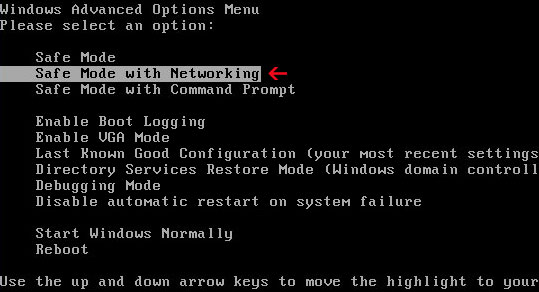
1. Reboot your computer is "Safe Mode with Networking". As the computer is booting tap the "F8 key" continuously which should bring up the "Windows Advanced Options Menu" as shown below. Use your arrow keys to move to "Safe Mode with Networking" and press Enter key. Read more detailed instructions here: http://www.computerhope.com/issues/chsafe.htm


NOTE: Login as the same user you were previously logged in with in the normal Windows mode.

2. Launch Internet Explorer. In Internet Explorer go to: Tools → Internet Options → Connections tab. Click Lan Settings button and uncheck the checkbox labeled Use a proxy server for your LAN. Click OK. You may have to repeat steps 1-2 if you will have problems downloading malware removal programs.


3. Download free anti-malware software from the list below and run a full system scan.
NOTE: in some cases the rogue program may block anti-malware software. Before saving the selected program onto your computer, you may have to rename the installer to iexplore.exe or winlogon.exe With all of these tools, if running Windows 7 or Vista they MUST be run as administrator. Launch the program and follow the prompts. Don't forget to update the installed program before scanning.

4. Go back to Normal Mode and follow the TDSS, Alureon, Tidserv, TDL3 removal instructions to remove the rootkit from your computer.

Share this information with your friends:

Thursday, September 29, 2011

How to Remove Security Sphere 2012 (Uninstall Guide)

Don't Copy From This Blog...

Protected by Copyscape Plagiarism Detection
Security Sphere 2012 is malware commonly known as a fake anti-virus product which displays misleading security alerts, effectively blocks Windows system tools, anti-malware software and web browsers and reports non-existent infections to make you think that your computer is infected with sophisticated malware. The majority of malicious software is written for profit, rogue AVs are are no exception. Cyber criminals use various methods to distribute malware: spam, blackhat SEO techniques, drive-by downloads, software exploits or even fake online security scanners. Most of the techniques cyber crooks use to install Security Sphere 2012 and other malicious software, for example rootkits, rely heavily on user interaction. Usually, malware is part of a social engineering attack. Once installed, Security Sphere 2012 not only displays fake security warnings and notifications from Windows taskbar but also may render your computer difficult to use. Security Sphere blocks Task Manager, Internet Explorer (other web browsers too) and genuine malware removal programs. In some cases, the rogue program may allow web browser to start, however, after a few seconds it displays bogus notification saying that the website you are about to visit is trying to execute malicious code and was blocked in order to protect your computer. Just like any other widespread rogue anti-virus program Security Sphere 2012 go beyond aggressive marketing to sell software that has no functionality and provides you a false sense of security. If your computer is infected with Security Sphere 2012, please follow the removal instructions below.


Here are some sceenshots of fake security alerts generated by Security Sphere 2012:
Warning: Your computer is infected
Detected spyware infection!
Click this message to install the last update of security software...

Warning!
Application cannot be executed. The file taskmgr.exe is infected.
Please activate your antivirus software.

Security Sphere 2012 Firewall Alert
Security Sphere 2012 has blocked a program from accessing the internet
Internet Explorer Internet browser is infected with worm Lsas.Blaster.Keyloger.

Security Sphere 2012
WARNING! 38 infections found!!!


Rogue AVs face survival challenges just like any other type of malicious software. Security Sphere 2012 drops a rootkit from the TDSS family. The rootkit must be removed; otherwise, the rogue program will be re-downloaded onto your computer. Thankfully, there's a tool called TDSSKiller which is designed to remove TDL3/4 and other rootkits from infected computer. For more informarion, please see the removal instructions below. If for any reasons you can't disable Security Sphere 2012 and run anti-malware software, you can activate the rogue program and disable the restrictions.

1. Please enter the following code: 8945315-6548431.


2. Once this is done, you are free to install recommended anti-malware software (Spyware Doctor) and remove the rogue anti-virus program from your computer properly.

Finally, if you have already purchased this fake security application, please contact your credit card company and dispute the charges. Please note that you may become a victim of credit card scam or even identity theft. Compute wisely!


Security Sphere 2012 removal instructions:

1. Please reboot your computer is "Safe Mode with Networking". As the computer is booting tap the "F8 key" continuously which should bring up the "Windows Advanced Options Menu" as shown below. Use your arrow keys to move to "Safe Mode with Networking" and press Enter key.


NOTE: Login as the same user you were previously logged in with in the normal Windows mode.

2. Download recommended anti-malware software (Spyware Doctor) and run a full system scan to remove this virus from your computer.


Alternate Security Sphere 2012 removal instructions:

Make sure that you can see hidden and operating system protected files in Windows. For more in formation, please read Show Hidden Files and Folders in Windows.

Under the Hidden files and folders section, click Show hidden files and folders, and remove the checkmarks from the checkboxes labeled:
  • Hide extensions for know file types
  • Hide protected operating system files
Click OK to save the changes.


1. Find Security Sphere 2012 file(s).

On computers running Windows XP, malware hides in:
C:\Documents and Settings\All Users\Application Data\

On computers running Windows Vista/7, malware hides in:
C:\ProgramData\

2. Look for malicious files in the given directories depending on the Windows version you have.

Example Windows XP:
C:\Documents and Settings\All Users\Application Data\eG13602PoDbI13602.exe

Example Windows Vista/7:
C:\ProgramData\eG13602PoDbI13602.exe

Basically, there will be a malicious ".exe" file named with a series of numbers or letters.


Rename eG13602PoDbI13602.exe to eG13602PoDbI13602.vir. Here's an example:


3. Restart your computer. After a reboot, Security Sphere 2012 won't start and you will be able to run anti-malware software.

4. Open Internet Explorer. Download exe_fix.reg and run it. Click "Yes" to safe the changes.

5. Download recommended anti-malware software (Spyware Doctor) and run a full system scan to remove this virus from your computer.

NOTE: in some cases the rogue program may block anti-malware software. Before saving the selected program onto your computer, you may have to rename the installer to iexplore.exe or winlogon.exe With all of these tools, if running Windows 7 or Vista they MUST be run as administrator. Launch the program and follow the prompts. Don't forget to update the installed program before scanning.
Security Sphere 2012 removal video:


Associated Security Sphere 2012 files and registry values:

Files:

Windows XP:
  • C:\Documents and Settings\All Users\Application Data\[SET OF RANDOM CHARACTERS].exe
Windows Vista/7:
  • C:\ProgramData\[SET OF RANDOM CHARACTERS].exe
Registry values:
  • HKEY_USERS\.DEFAULT\Software\Microsoft\Internet Explorer\Main\featurecontrol\FEATURE_BROWSER_EMULATION "svchost.exe"
  • HKEY_USERS\.DEFAULT\Software\Microsoft\Windows\CurrentVersion\Internet Settings "enablehttp1_1" = '1'
  • HKEY_CURRENT_USER\Software\Microsoft\Windows\CurrentVersion\RunOnce "[SET OF RANDOM CHARACTERS]"
Share this information with other people:

Wednesday, September 28, 2011

Remove Advanced PC Shield 2012 (Uninstall Guide)

Don't Copy From This Blog...

Protected by Copyscape Plagiarism Detection
Advanced PC Shield 2012 is a rogue anti-virus program meant to scare you into thinking that your computer is infected with Trojans, spyware and other malicious software, according to malekal.com. It may display pop-ups saying that malicious software has been detected on your computer. It then may redirect you to a website where you can purchase the rogue program in order to remove viruses and to protect your computer against emerging threats. Do not purchase this bogus software and do not share personal information like passwords, credit card numbers, etc., with cyber crooks. It won't protect your computer against malware anyway. Advanced PC Shield 2012 may block system utilities and legitimate anti-virus software as well. We can confirm that there is no legitimate security product with such a name on the market. If your computer is infected with Advanced PC Shield 2012, please follow the steps in the removal guide below.


Update (4:15 PM EDT): We received an email from our reader Colin saying that his laptop has just got infected with a virus called Advanced PC Shield 2012. The following files have been contributed by our reader:
  • C:\Documents and Settings\Colin\Start Menu\Programs\Advanced PC Shield 2012\Buy Advanced PC Shield 2012.lnk
  • C:\Documents and Settings\Colin\Start Menu\Programs\Advanced PC Shield 2012\Launch Advanced PC Shield 2012.lnk
  • C:\Documents and Settings\Colin\Desktop\Buy Advanced PC Shield 2012.lnk
  • C:\Documents and Settings\Colin\Local Settings\Application Data\gr5291f5w5071a02.exe
  • HKEY_CURRENT_USER\Software\Microsoft\Windows\CurrentVersion\Run "gr5291f5w5071a02.exe"
The fake program attempted the following network connection: 178.162.174.147. It appears to be a control center.

Update (4:23 PM EDT):
Virustotal.com results: 2 /42
MD5: 4182cf81203e73ef44e642214b04d712
http://www.virustotal.com/file-scan/report.html?id=06b773f3a121851b9919e905b925721c2b2189372f407085aec611727f18e2a0-1317223457


Update (7:56 PM EDT):
Advanced PC Shield 2012 displays the following fake security alerts:
Severe system damage!
Spyware and viruses detected in the background. Sensitive system components under attack! Data loss, identity theft and system corruption are possible.
Act now, click here for a free security scan.

Tracking software found!
Your PC activity is being monitor. Possible spyware infection. Your data security may be compromised. Sensitive data can be stolen.
Prevent damage now by completing a security scan.


This scarware reports the same infections on different computers. It doesn't actually scan your computer. Advanced PC Shield 2012 reports the following infections:
  • Java.Trojan.Downloader.OpenConnection
  • Trojan.Spy.ZBot
  • Worm.P2P.Pron
  • Exploit.CplLnk.Gen
  • Win32.Worm.Prolaco
  • Trojan.Android.Geinimi
  • Backdoor.Destroy
  • AprNet-Worm.Win32.Kolab
  • Win32.Worm.Stuxnet
  • Trojan.MSIL.Agent
  • Trojan.Win32.Agent
  • Trojan.Spy.Ursnif
  • Win32.Ramnit
  • Java.Backdoor.ReverseBackdoor
  • Backdoor.Bifrose
  • Backdoor.Win32.Rbot
  • AprWorm.Win32.Agent
  • Trojan.Win32.Qhost
  • wscui_class
The rogue application displays fake Windows Security Center screen and fake BSOD.


Cyber crooks offer online support too. You can leave a ticket at advancedpc.coguar-systems-support.info. There's a great chance that they will actually help you, however, any any payment-related questions are usually ignored.


Although, Advanced PC Shield 2012 doesn't block malware removal tools, at least the current version, you can still activate it manually and make the removal procedure easier in case you got more aggressive version of this fake anti-virus product. Just click on Registration and select Manual Activation. Then use the following code: 8945315-6548431


However, the biggest problem is that Advanced PC Shield 2012 drops a rootkit (Trojan:WinNT/Necurs) that blogs legitimate anti-virus programs and makes it difficult to remove the infection from the computer. Hopefully, you can use TDSSKiller to remove rootkits from your computer. Otherwise, you'll have to use Combofix. For more information, please follow the removal instructions below.


Advanced PC Shield 2012 removal instructions:

1. Download ComboFix from one of the following URL: http://www.bleepingcomputer.com/download/anti-virus/combofix
2. Temporarily disable your anti-virus and anti-spyware programs as they may may interfere with Combofix.
3. Double-click on the ComboFix to run the utility. Please read the disclaimer and if you agree, click on the I Agree button.


4. ComboFix is now preparing to run. It may take a few moments. ComboFix will create a System Restore and prompt you to install Microsoft Windows Recovery Console. Please click on the Yes button to continue.


5. Please follow the directions given by ComboFix in order to finish the installation of the Microsoft Windows Recovery Console. Once finished, click on the Yes button to scan your computer for malware.


6. ComboFix will now start scanning your computer for malicious software. This may take up to ten minutes.


7. When ComboFix has finished, it may automatically reboot your computer. Don't worry, that's OK. Just don't reboot your computer manually. After a reboot it will show a log file. Advanced PC Shield 2012 should be gone from your computer.

8. Download free anti-malware software from the list below and run a full system scan to remove the remains.
NOTE: with all of these tools, if running Windows 7 or Vista they MUST be run as administrator. Launch the program and follow the prompts. Don't forget to update the installed program before scanning.


Associated Advanced PC Shield 2012 files and registry values:

Files:

Windows XP:
  • %WINDIR%\SYSTEM32\drivers\[SET OF RANDOM CHARACTERS].sys
  • %UserProfile%\Start Menu\Programs\Advanced PC Shield 2012\Buy Advanced PC Shield 2012.lnk
  • %UserProfile%\Local Settings\Application Data\[SET OF RANDOM CHARACTERS].exe
  • %UserProfile%\Desktop\Buy Advanced PC Shield 2012.lnk
  • %UserProfile%\Start Menu\Programs\Advanced PC Shield 2012\Launch Advanced PC Shield 2012.lnk
%WINDIR% refers to: C:\WINDOWS
%UserProfile% refers to: C:\Documents and Settings\[User Name]

Windows Vista/7:
  • %WINDIR%\SYSTEM32\drivers\[SET OF RANDOM CHARACTERS].sys
  • %UserProfile%\Start Menu\Programs\Advanced PC Shield 2012\Buy Advanced PC Shield 2012.lnk
  • %UserProfile%\Local Settings\Application Data\[SET OF RANDOM CHARACTERS].exe
  • %UserProfile%\Desktop\Buy Advanced PC Shield 2012.lnk
  • %UserProfile%\Start Menu\Programs\Advanced PC Shield 2012\Launch Advanced PC Shield 2012.lnk
%WINDIR% refers to: C:\WINDOWS
%UserProfile% refers to: C:\Users\[User Name]

Registry values:
  • HKEY_LOCAL_MACHINE\SYSTEM\CurrentControlSet\Services\[SET OF RANDOM CHARACTERS]
  • HKEY_CURRENT_USER\Software\Microsoft\Windows\CurrentVersion\Internet Settings\ZoneMap\Ranges\Range1 "*" = '1'
  • HKEY_CURRENT_USER\Software\Microsoft\Windows\CurrentVersion\Internet Settings\ZoneMap\Ranges\Range1 ":Range" = '127.0.0.1'
  • HKEY_CURRENT_USER\Software\Microsoft\Windows\CurrentVersion\Run "[SET OF RANDOM CHARACTERS].exe"
Share this information with your friends:

Tuesday, September 27, 2011

Notification of Limited Account Access - PayPal Phishing

Don't Copy From This Blog...

Protected by Copyscape Plagiarism Detection
Here's an example of another phishing attempt against Paypal users. This time phishers claim that PayPal has developed a new security method intended to protect account information. Phishing e-mail asks you to verify your account data at PayPal by visiting the given link which appears to be genuine but it actually isn't. Please note that PayPal never send their users emails requesting personal details. So, in this case, you will be taken to a phishing website where your details will be captured for the phishers and then used to compromise your PayPal account. If you've received the following phishing email, please mark it as spam and delete it from your inbox.

Content of the phishing email:
Dear PayPal member,


Our company has developed a new security method intended to protect our members account information, therefore adatabase update is required to keep up to date your online account profile. To proceed, you will have to complete our online account verification form by clicking the following link...

Legitimate website: https://www.paypal.com/
Phishing website: http://forzieri-italia.com/paypal/
Return email address: support@epay.com

Here's a screenshot of the phishing email:


Share this information with your friends:

 
//PART 2