Saturday, May 15, 2010

Remove Av-special.com (Free removal)

Don't Copy From This Blog...

Protected by Copyscape Plagiarism Detection
Av-special.com is one of many risky websites that should be added to the list of potentially harmful websites. Don't know why? The answer is simple, because it promotes rogue anti-spyware program and hosts harmful files. Av-special.com promotes Antispyware Soft which is a rogue anti-spyware program that reports non-existent infections and displays fake warnings to make you think that your computer is infected with malicious software. Finally, it prompts to pay for a full version of the program to remove the infections which don't actually exist. Don't buy it! If you have already bought it then you should call your credit card company and dispute the charges.

If you find that your computer is infected with Antispyware Soft or other malware that redirects you to Av-special.com then you should scan your computer with reputable anti-malware or anti-virus software. Please read how to remove Antispyware Soft. If you have any questions or additional information about Av-special.com or Antispyware Soft, please don't hesitate and leave a comment.

Av-special.com screenshot:


Share this information with other people:

How to remove EZLife adware (Removal instructions)

Don't Copy From This Blog...

Protected by Copyscape Plagiarism Detection
EZLife is an adware program that delivers various advertisements on the users' computers. This potentially unwanted application creates a startup registry entry so that it executes whenever Windows starts. It also registers a Browser Helper Object (BHO) and may redirect to various unrelated websites full of online ads. In general, this potentially unwanted program should be removed from the computer upon detection. If you find that your computer is infected with Adware.EZLife please follow the removal instructions below to remove it. If you have any questions or additional information about this adware, please leave a comment. Good luck and be safe!


EZLife adware removal instructions:
Download one of the following anti-malware software and run a full system scan:
If the recommended malware removal tools fail to detect it, the follow the manual removal instructiobs below.

EZLife adware manual removal instructions:

1. Click Start -> Run.
2. Type "regedit" (without quotation-marks)
3. Click OK.
4. Navigate to and delete the following registry entries:
  • HKEY_LOCAL_MACHINE\SOFTWARE\Microsoft\Windows\CurrentVersion\Run\"ezLife" = "C:\WINDOWS\system32\[RANDOM FILE NAME ONE].dll"
  • HKEY_CLASSES_ROOT\CLSID\{E0EC6FBA-F009-3535-95D6-B6390DB27DA1}\InprocServer32\"default" = "C:\WINDOWS\system32\[RANDOM FILE NAME ONE].dll"
  • HKEY_CLASSES_ROOT\CLSID\{275817B3-0A2A-4BFE-8036-0B61D81FE603}\InprocServer32\"default" = "C:\WINDOWS\system32\[RANDOM FILE NAME TWO].dll"
5. Navigate to and delete the following registry subkeys:
  • HKEY_LOCAL_MACHINE\SOFTWARE\Microsoft\Windows\CurrentVersion\Uninstall\Smart-Ads-Solutions\UninstallString
  • HKEY_LOCAL_MACHINE\SOFTWARE\Microsoft\Windows\CurrentVersion\Uninstall\ezLife\UninstallString
  • HKEY_CLASSES_ROOT\CscrptXt.CscrptXt.1.0
  • HKEY_CLASSES_ROOT\CscrptXt.CscrptXt
  • HKEY_CLASSES_ROOT\adHlpr.adHlpr.1.0
  • HKEY_CLASSES_ROOT\adHlpr.adHlpr
  • HKEY_CLASSES_ROOT\adShotHlpr.adShotHlpr.1.0
  • HKEY_CLASSES_ROOT\adShotHlpr.adShotHlpr
  • HKEY_CURRENT_USER\Software\Smart-Ads-Solutions
  • HKEY_CURRENT_USER\Software\ezLife
  • HKEY_LOCAL_MACHINE\SOFTWARE\Smart-Ads-Solutions
  • HKEY_LOCAL_MACHINE\SOFTWARE\ezLife
  • HKEY_CLASSES_ROOT\AppID\{38061EDC-40BB-4618-A8DA-E56353347E6D}
  • HKEY_CLASSES_ROOT\AppID\{A9722A0D-365F-47D2-B70B-37D046316D99}
  • HKEY_LOCAL_MACHINE\SOFTWARE\Microsoft\Windows\CurrentVersion\Uninstall\Smart-Ads-Solutions
  • HKEY_LOCAL_MACHINE\SOFTWARE\Microsoft\Windows\CurrentVersion\Uninstall\ezLife
6. Close registry editor.
7. Remove the following files and folders:
  • C:\Program Files\Smart-Ads-Solutions
  • C:\Program Files\ezLife
  • C:\WINDOWS\system32\[RANDOM FILE NAME ONE].dll
  • C:\WINDOWS\system32\[RANDOM FILE NAME TWO].dll
  • %UserProfile%\Application Data\Smart-Ads-Solutions\SmartAds\download\bndl_1540.exe
  • %ProgramFiles%\ezLife\ezLife\1.5.4.0\uninstall.exe
  • %ProgramFiles%\Smart-Ads-Solutions\SmartAds\1.4.6.0\uninstall.exe
Please share this information with other people:

Monday, May 10, 2010

Remove Antivirzilla.com (Free removal)

Don't Copy From This Blog...

Protected by Copyscape Plagiarism Detection
Antivirzilla.com is a misleading website that promotes the rogue anti-spyware program called Virus Protector. At first glance it doesn't look like a harmful website, but actually it is. It hosts harmful files, though the download link is not visible on the main page. As a typical misleading website it provides false information and displays fake awards on each page. There is also a possibility to purchase Virus Protector directly from Antivirzilla.com. But of course, you shouldn't do that.

If your PC got infected with Virus Protector, you will notice that right away. The rogue program reports false system security threats like every few minutes and prompts to pay for a full version of the program to remove the infections which don't exist. Your documents and other data should be safe, however, you need to remove Virus Protector and any related malware from your computer as soon as possible. Please follow Virus Protector removal instructions. Also add Antivirzilla.com to the list of harmful websites. If you have any questions or additional information about this virus, please leave a comment. Good luck and be safe!

Screenshot of Antivirzilla.com


Virus Protector purchase screen


Share this information with other people:

Saturday, May 8, 2010

How to remove RST Antivirus 2010 (Uninstall guide)

Don't Copy From This Blog...

Protected by Copyscape Plagiarism Detection
RST Antivirus 2010 is a potentially unwanted anti-spyware application that may reports false or exaggerated system security threats on your computer. It has to be manually installed. The homepage of RST Antivirus 2010 is rtsantivirus2010 .com. It provides mostly false information about RSTAntivirus2010 such as "RTS Antivirus 2010 is a reputable Windows Vista certified application." I don't really think that's true. Besides, it's not even clear how this application should be called RST Antivirus 2010, RST Antivirus 2010 or RTS Antivirus 2010 Pro.


If you download it from its homepage, you will see that it's actually called RST Antivirus 2010 instead of RTS Antivirus 2010.


This potentially unwanted application will state that your security status is high and that you have a registered version of RST Antivirus 2010. Anyway, it's not reputable anti-spyware software. You shouldn't install it. If you find that RST Antivirus 2010 is already installed on your PC, please uninstall it as soon as possible. If you have any questions or additional information about this program, please don't hesitate and leave a comment. Good luck and be safe!


RST Antivirus 2010 removal instructions:
Download one of the following anti-malware software and run a full system scan:

RST Antivirus 2010 associated files and registry values:

Files:
  • C:\Program Files\RST Antivirus 2010\comdlg32.dll
  • C:\Program Files\RST Antivirus 2010\libclamav.dll
  • C:\Program Files\RST Antivirus 2010\pthreadVC2.dll
  • C:\Program Files\RST Antivirus 2010\uninstall.bat
  • C:\Program Files\RST Antivirus 2010\dwmapi.dll
  • C:\Program Files\RST Antivirus 2010\oledlg.dll
  • C:\Program Files\RST Antivirus 2010\RST Antivirus 2010.exe
  • C:\Program Files\RST Antivirus 2010\WININET.dll
Please share this information with other people:

Friday, May 7, 2010

How to remove Data Protection (Uninstall guide)

Don't Copy From This Blog...

Protected by Copyscape Plagiarism Detection
Data Protection is a fake anti-virus program that gives false exaggerated reports of threats on your computer and displays fake security warnings to make you think that your PC is infected with malware. This fake program is from the same family as Digital Protection and Your Protection scareware. It's not a real anti-virus program and it actually can't remove any infections from your computer, so you shouldn't trust it. Most importantly, don't buy it! It will prompt you top pay for a full version of the program to remove non-existent infections. DataProtection is nothing more but a scam. If you are reading this article then I guess your computer is already infected with this annoying program. Thankfully, we've got instructions to help you. Please follow the Data Protection removal instructions below.


This fake program is promoted and installed through the use of Trojans and other malware. Usually, Trojans come from fake online scanners or misleading online video websites as flash player updates or video codecs. Once installed, Data Protection will simulate system scan and report false system security threats. Moreover, it will attempt to uninstall legitimate anti-virus and anti-spyware programs from your computer. The rogue program will state that your current antivirus software is infected and that you should remove it. Of course, that's not true. Furthermore, it will display fake security alerts every few minutes. The text of some of these warnings are:

"Warning! Adware detected!
Adware module detected on your PC!
Zlob.Porn.Ad adware has been detected. This adware module advertises websites with explicit content. Be advised of such content being possibly illegal. Please click the button below to locate and remove this threat now."


"Warning! Virus threat detected!
Virus activity detected!
Trojan-Downloader.VBS adware has been detected. This adware module advertises websites with explicitly content. Be advised of such content being possibly illegal. Please click the button below to locate and remove this threat now."


"Danger!
A security threat detected on your computer. TrojanASPX.JS.Win32. It strongly recommended to remove this threat right now. Click on the message to remove it."

Last, but not least, Data Protection will block legitimate anti-virus and anti-malware programs, hijack Internet Explorer and add some porn icons on your Desktop. Also note that this fake program may come bundled with TDSS rootkit. That's why we strongly recommend you to scan your computer with TDSSKiller utility from Kaspersky lab (it removes rootkits for free). Another thing, if you can't download or launch malware removal tools because Data Protection blocks them, then you will have to reboot your computer in Safe Mode with Networking (follow removal instructions below). Finally, if you have any questions or additional information about this virus, don't hesitate and leave a comment. By the way, if you have already purchased it, then you should contact your credit card company and dispute the charges. Good luck and be safe!


Data Protection removal instructions (in Safe Mode with Networking, Method 1):

1. Reboot your computer is "Safe Mode with Networking". As the computer is booting tap the "F8 key" continuously which should bring up the "Windows Advanced Options Menu" as shown below. Use your arrow keys to move to "Safe Mode with Networking" and press Enter key. Read more detailed instructions here: http://www.computerhope.com/issues/chsafe.htm
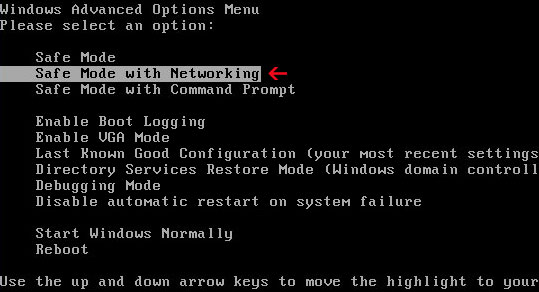


NOTE: Login as the same user you were previously logged in with in the normal Windows mode.

2. Download SUPERAntispyware, MalwareBytes Anti-malware, Spybot - Search & Destroy or Spyware Doctor and run a full system scan. NOTE: before saving the selected program onto your computer, please rename the installer to winlogon.exe or iexplore.exe. Launch the program and follow the prompts. Don't forget to update the installed program before scanning. Then reboot your computer in "Normal Mode" and run  a system scan again. That's it!
4. New threats appear every day. In order to protect your PC from such (new) infections we strongly recommend you to use ESET Smart Security.


Data Protection removal instructions: (Method 2)

1. Download the file TDSSKiller.zip and extract it into a folder
2. Execute the file TDSSKiller.exe (NOTE: you may have to rename TDSSKiller.exe to explorer.com yourself or download already renamed explorer.com file in order to run it)
3. Follow the prompts and wait for the scan and disinfection process to be over. Close all programs and press “Y” key to restart your computer.
More detail TDSSKiller tutorial: http://support.kaspersky.com/viruses/solutions?qid=208280684
4. Download one of the following anti-malware software and run a full system scan:
5. New threats appear every day. In order to protect your PC from such (new) infections we strongly recommend you to use ESET Smart Security.


Data Protection associated files and registry values:

Files:
  • C:\Documents and Settings\All Users\Application Data\[random].dll
  • %UserProfile%\Start Menu\Programs\Data Protection
  • C:\Program Files\Data Protection
  • C:\Program Files\Data Protection\about.ico
  • C:\Program Files\Data Protection\activate.ico
  • C:\Program Files\Data Protection\buy.ico
  • C:\Program Files\Data Protection\dat.db
  • C:\Program Files\Data Protection\datext.dll
  • C:\Program Files\Data Protection\dathook.dll
  • C:\Program Files\Data Protection\datprot.exe
  • C:\Program Files\Data Protection\help.ico
  • C:\Program Files\Data Protection\scan.ico
  • C:\Program Files\Data Protection\settings.ico
  • C:\Program Files\Data Protection\splash.mp3
  • C:\Program Files\Data Protection\Uninstall.exe
  • C:\Program Files\Data Protection\update.ico
  • C:\Program Files\Data Protection\virus.mp3
  • %Temp%\4otjesjty.mof
  • %Temp%\MSWINSCK.exe
  • %Temp%\wscsvc32.exe
Registry:
  • HKEY_CURRENT_USER\Software\Malware Defense
  • HKEY_CURRENT_USER\Software\Paladin Antivirus
  • HKEY_CLASSES_ROOT\CLSID\{5E2121EE-0300-11D4-8D3B-444553540000}
  • HKEY_LOCAL_MACHINE\SOFTWARE\Data Protection
  • HKEY_LOCAL_MACHINE\SOFTWARE\Malware Defense
  • HKEY_LOCAL_MACHINE\SOFTWARE\Microsoft\Windows\CurrentVersion\Uninstall\Data Protection
  • HKEY_LOCAL_MACHINE\SOFTWARE\Paladin Antivirus
  • HKEY_LOCAL_MACHINE\SOFTWARE\Program Groups
  • HKEY_CURRENT_USER\Software\Microsoft\Windows\CurrentVersion\Policies\System "DisableTaskMgr" = "1"
  • HKEY_CURRENT_USER\Software\Microsoft\Windows\CurrentVersion\Run "Data Protection"
  • HKEY_LOCAL_MACHINE\SOFTWARE\Microsoft\Windows\CurrentVersion\policies\system "DisableTaskMgr" = "1"
  • HKEY_LOCAL_MACHINE\SOFTWARE\Microsoft\Windows\CurrentVersion\Shell Extensions\Approved "{5E2121EE-0300-11D4-8D3B-444553540000}"
Please share this information with other people:

 
//PART 2