Saturday, January 16, 2010

Avoid Antispyunderware.com browser hijacker

Don't Copy From This Blog...

Protected by Copyscape Plagiarism Detection
Antispyunderware.com is a browser hijacker that imitates a system scan and reports false scan results. It displays fake alerts stating that your computer is badly infected and that you should install free removal tool in order to fix found system security threats and remove infections. In short, this is a scam. Such websites as antispyunderware.com are used to promote rogue anti-virus software. In this case it's the rogue anti-spyware application called System Security. Avoid such websites! Also note that Antispyunderware.com displays notifications that read like this one below:

"Warning!!! Your computer contains various signs of viruses and malware programs presence. Your system requires immediate anti viruses check! System Security will perform a quick and free scanning of your PC for viruses and malicious programs."

Remove DefendAPc virus (Uninstall instructions)

Don't Copy From This Blog...

Protected by Copyscape Plagiarism Detection
DefendAPc is a fake anti-spyware application that is promoted through the use of fake online scanners and misleading websites. One way or another, this malicious software has to be manually installed. The rogue program can be also installed from its home page defendapc.com (don't visit this website; otherwise you will infect your PC with Trojan.FakeAlert.AB virus). Once installed, DefendAPc displays fake security alerts and tries to scare you into thinking that your computer is infected. It even imitates a system scan and reports false scan results. As you know, this program is a scareware, so the scan results are obviously fabricated.


Moreover, DefendAPc hijacks Internet Explorer and displays fake notifications about "Insecure Interner Activity. Threat of virus attack". This virus also hijacks search engine results (usually Google, but may hijack other web search engines too). DefendAPc redirects users to various bogus websites that either promote other fake software or display false information. What is more, this malware constantly displays fake security alerts. One of those alerts states:

"Spyware Alert!
Your computer is infected with spyware. It could damage your critical files or expose your private data on the Internet. Click here to register your copy of BlockProtector and remove spyware threats from your PC."


Ok, now let's talk about the most important part: how to remove DefendAPc? This can be done either manually or with an anti-spyware application. Please note that manual removal can be a bit complicated as the rogue program creates randomly named files and there is also a chance that it installs additional malware once active. In order to remove this malware completely you should use one of the following programs:

Manual removal guide:

DefendAPc directories:
  • C:\Program Files\DefendAPc Software\ (delete all files in this folder)
Defend APc files:
  • DefendAPc.exe
  • uninstall.exe
  • %Temp%\[random].exe 
  • C:\WINDOWS\system32\[random].exe 
DefendAPc registry values:
  • HKEY_CURRENT_USER\Software\DefendAPc
  • HKEY_LOCAL_MACHINE\SOFTWARE\DefendAPc
  • HKEY_LOCAL_MACHINE\SOFTWARE\Microsoft\Windows\CurrentVersion\Uninstall\DefendAPc
  • HKEY_LOCAL_MACHINE\SOFTWARE\Microsoft\Windows\CurrentVersion\Run "DefendAPc" 
  • HKEY_CURRENT_USER\Software\Microsoft\Windows\CurrentVersion\Run "[random].exe" 
NOTE: if you can't remove the above files or use an anti-spyware application in "Normal Mode" then do that ir "Safe Mode with Networking". Good luck!

Last update: 01/16/2010

Friday, January 15, 2010

Softwarespam.net promotes Ghost Antivirus scareware (Remove Softwarespam.net)

Don't Copy From This Blog...

Protected by Copyscape Plagiarism Detection
There is a list of active websites (classified as browser hijackers) that promote the scareware called Ghost Antivirus. Those websites are: (NOTE: please don't visit the websites listed below. Otherwise, you can automatically infect your PC)
  • Softwarespam.net 
  • Softwareanti.com
  • Softwarerising.com
  • Softwaresecure.net
  • Softwarejar.com 
  • Softwarethreats.com 
  • Softwarespyware.net
  • Softwarethe.net
  • Softwarethreats.net
  • Softwarexp.net
The above sites load from the same server with IP 93.190.140.165. These websites imitate online anti-malware scanners and display bogus scan results. Here's an example of a fake scan:


As you can see from the image above, Softwarespam.net impersonates Windows OS "My Computer" view. It then displays "Ghost Antivirus Warning!" and recommends downloading this fake virus remover to remove supposedly found infections. Leave this and similar websites immediately. If your PC is already infected, please read Ghost Antivirus removal guide. Good luck!

Thanks to Sandi Hardmeier for the above list of malicious sites.

Remove Ghostantivirus.com scam (ghost-antivirus.com)

Don't Copy From This Blog...

Protected by Copyscape Plagiarism Detection
Ghostantivirus.com is a malicious website that promotes the rogue anti-virus application called Ghost Antivirus. Three other domains are involved too:
  • Ghost-antivirus.com
  • Ghost-pay.com
  • Ghostpays.com
These websites have the same IP: 93.174.95.194. If you constantly see one of these malicious websites that means either your PC is infected with Ghost Antivirus or a particular Trojan virus. Anyhow, you should downlaod an anti-malware application and run a full system scan. For others we just recommend to avoid these websites because they may automatically infect your computer. Stay safe!

Screen shot of  Ghost-antivirus.com

How to remove Ghost Antivirus (free removal guide)

Don't Copy From This Blog...

Protected by Copyscape Plagiarism Detection
Ghost Antivirus is a fake anti-virus program. It's a typical scareware that displays fake security alerts just to scare you into thinking that your computer is infected with Trojans and other viruses. Some of the infections listed by this virus: Trojan-Spy.HTML.Bankfraud.ra, Trojan-Spy.HTML.Paylap, Trojan-Spy.HTML.Sunfraud and etc. Actually, these supposed infections were used and probably will be used again by other rogue programs too. The most important thing is to realize that all those infections are actually fictitious. Secondly, don't purchase this bogus software. The main aim of Ghost Antivirus is to trick out money from you. Please read the removal guide below and remove this virus from your computer for free.


Ghost Antivirus has to be manually installed either from its home page or from fake online scanners that use Windows OS graphics to make the scam look more reliable. In short, please avoid these websites:
  • Ghost-antivirus .com 
  • Ghostantivirus .com 
  • Ghost-pay .com
  • Ghostpays .com 
Browser hijackers that are recently used to promote this malware: softwareanti .com, softwarejar .com and many other similar websites. Just make sure to block these IPs: 93.190.140.165, 93.174.95.194 and 93.174.95.195.


Ok, now let's go the most important part - GhostAntivirus removal. Unfortunately, this virus has quite strong self-protection mechanism. It blocks anti-virus software and disables important system tools. Manual removal is not an oprion in this case, because Ghost Antivirus creates random files and randomly named directories usually under the Windows folder.
----------------------------------
Removal guide:

Step #1: Reboot your computer is "Safe Mode with Networking". As the computer is booting tap the "F8 key" continuously which should bring up the "Windows Advanced Options Menu" as shown below. Use your arrow keys to move to "Safe Mode with Networking" and press Enter key. 
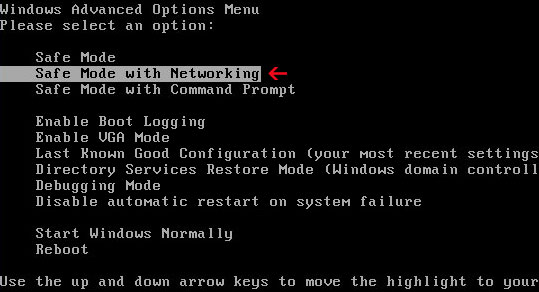


NOTE: Login as the same user you were previously logged in with in the normal Windows mode.

Step #2: Download SUPERAntispyware or MalwareBytes Anti-malware and run a full system scan. Don't forget to update the installed program before scanning. Then reboot your computer in "Normal Mode" and run  a system scan again.
----------------------------------

Manual removal: When in "Safe Mode with Networking" you can try to remove Ghost Antivirus files listed below manually. Then reboot your PC in "Normal Mode" and run a system scan to remove the remains or additionally installed malware.

Ghost Antivirus Folder: 
  • C:\Program Files\Ghost Antivirus\  (note: removal entire folder with all files in it)
  • C:\Documents and Settings\All Users\Start Menu\Programs\Ghost Antivirus\ 
  • %UserProfile%\Application Data\Ghost Antivirus\ 
Registry values:
  • HKEY_CURRENT_USER\Software\Microsoft\Windows\CurrentVersion\Run
    "Ghost Antivirus"=-
  • -HKEY_CURRENT_USER\Software\Microsoft\Windows\CurrentVersion\Policies\Explorer\Run
  • HKEY_LOCAL_MACHINE\SOFTWARE\Microsoft\Windows\CurrentVersion\Uninstall\Ghost Antivirus_is1
  • HKEY_LOCAL_MACHINE\SOFTWARE\Microsoft\Windows NT\CurrentVersion\Image File Execution Options\taskmgr.exe
  • HKEY_CURRENT_USER\Software\Microsoft\FTP "SearchDir" = "c:\program files\Ghost Antivirus\"
  • HKEY_CURRENT_USER\Software\Microsoft\Windows\CurrentVersion\Policies\Explorer\Run "onin"
  • HKEY_CURRENT_USER\Software\Microsoft\Windows\CurrentVersion\Run "Ghost Antivirus"
  • HKEY_CURRENT_USER\Software\Microsoft\Windows\CurrentVersion\RunOnce "3P_UDEC"
  • HKEY_LOCAL_MACHINE\SOFTWARE\Microsoft\Windows\CurrentVersion\Internet Settings\5.0\User Agent "URIAPRO[1.1.3.9]"
  • HKEY_LOCAL_MACHINE\SOFTWARE\Microsoft\Windows NT\CurrentVersion\Image File
  • Execution Options\taskmgr.exe "Debugger" = "?"
  • HKEY_LOCAL_MACHINE\SOFTWARE\Microsoft\Windows NT\CurrentVersion\Image File
  • Execution Options\taskmgr.exe "RealDebugger" = "?"
  • HKEY_LOCAL_MACHINE\SOFTWARE\Microsoft\Windows NT\CurrentVersion\Winlogon "RealLogonType" = "1"
If you have any questions, don't hesitate and ask. Good luck!

Last update: 01/15/2010

 
//PART 2